Design shapes the way clients see your brand and feel your message. Canva makes it easy for you to create a Soulful Brand Design. For holistic entrepreneurs, every color, font, and image should reflect the energy and purpose behind your work.
I love using Canva for my business designs. I store my brand information in one place so it’s easily accessible. Canva makes design easy, even if you don’t consider yourself a designer.
I’m going to share some practical Canva design tips for holistic entrepreneurs. You’ll learn simple ways to build an authentic, soulful brand that attracts the right clients and grows your business with confidence.
If you’re new to Canva or still trying to find your way around, I have a blog post on Basic Canva Design for you to explore. It will help you get started.
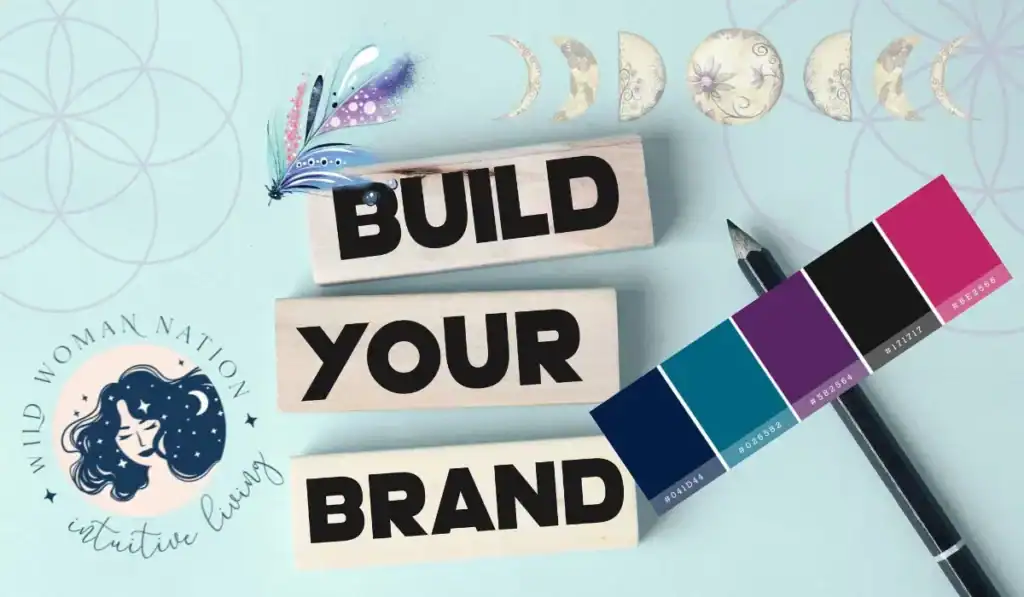
Understanding Your Holistic Brand Aesthetic
Before you open Canva and start picking templates, it’s worth taking a pause. Every holistic and spiritual brand has its own spark, one that goes beyond business and gets to the heart of what you offer.
When your visuals mirror your message, people trust you more. This part will help you move from intention to action: showing your vibe and purpose through every design choice.
It’s important to know what your vision, mission and values are before you get started. I spent years wasting time due to a lack of clarity in who I served and how.
Spending time to get this nailed down will save you countless hours and reduce your stress. But don’t waste too much of your time. Make a decision and GO FOR IT!
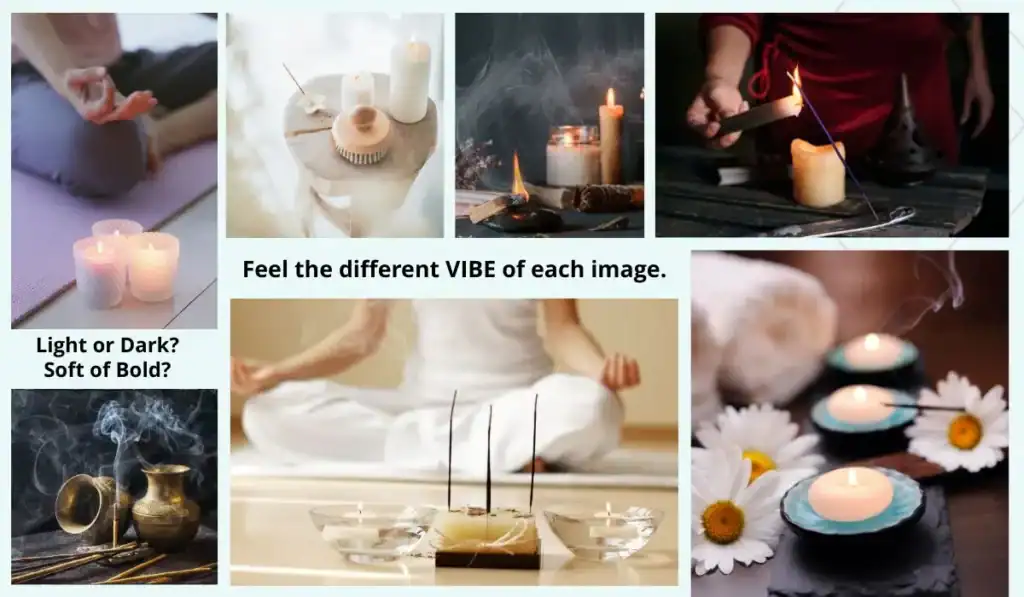
Identifying Core Brand Values and Visuals
Think about what makes your business different. Do you help people find calm? Connect to spirit? Heal or reconnect with nature?
What is your special brand of Magic? What transformation do you offer?
Start by writing down your core mission and a few words that describe how you want clients to feel when they see your brand.
When you know your guiding words, use Canva to bring them to life:
Colors: Calm brands often choose soft blues, greens, or neutrals. Bold, spirited brands may use earth tones or rich jewel hues.
Fonts: Look for fonts that match your message. Rounded, simple fonts feel warm and gentle, while hand-drawn styles hint at creativity and a personal touch.
I like to use a main serif font for the basic text and a script font for accent words in my designs. Just be careful and stick with easy-to-read fonts on your website.
Imagery: Select images that reflect your approach, whether it’s peaceful landscapes, cozy spaces, nature textures, or spiritual symbols.
Tip: Create a “brand mood board” in Canva. Add your main words, colors, and inspiration images, so you always have a north star for your designs.
Bonus Tip: When I am choosing colors, fonts, and images, I FEEL into the design and images. How do those colors and images make me feel. What emotions come forward. Then I decide, “Is that what I want my customers to feel too?”
Choosing Calming and Authentic Color Palettes
Colors shape how people feel the moment they see your content. For holistic entrepreneurs, the right tones can express trust and invite calm.
Start by exploring Canva’s color palette generator. Upload an image that inspires your work—like a forest, crystal, or cozy room—and let Canva pull out natural colors.
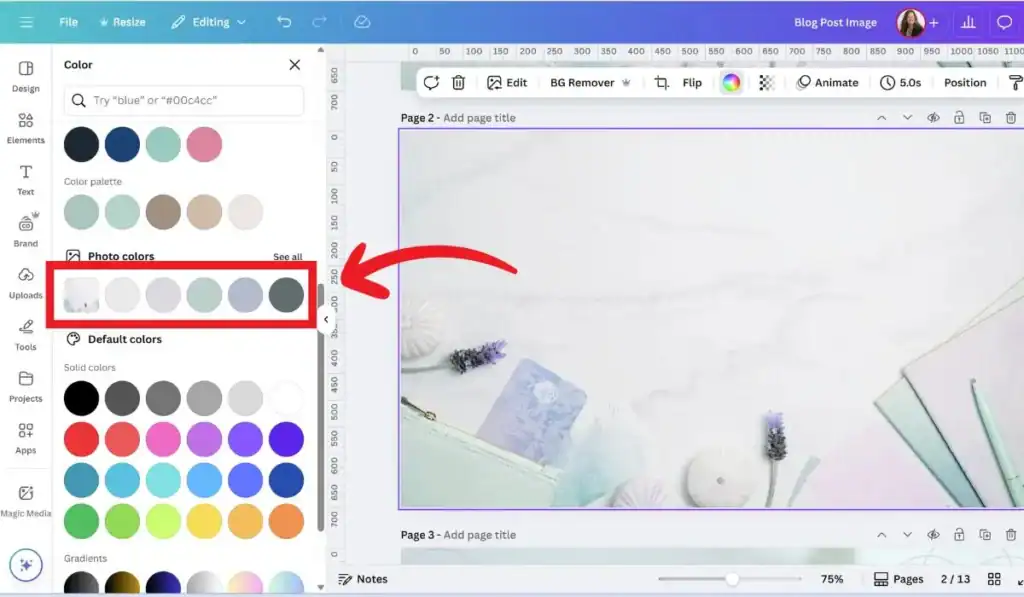
Canva will take the image as shown above, and pull out colors from the image (see red box above). Those are colors in that image.
Suppose you have an image you love and want to use that as the base to your brand. Upload that image into Canva and you’ll get your color palette quickly. It’s so easy.
You can also use Canva’s pre-made palette options by searching words like “wellness,” “organic,” or “earthy.”
If you don’t have a Canva Account yet, you can use my affiliate link to get a free account. I use the Pro account because there are so many cool features and options to unleash your creativity.
I also like to explore the ideas on Pinterest. Simply search for “Holistic Brand Boards” and you’ll find some great ideas.
Keep these tips in mind when choosing your palette:
- Stick to 2–4 main colors for a balanced look.
- Use softer shades (pastels, muted earth tones) to foster relaxation.
- Save bold or dark colors for accents or calls to action.
- Test backgrounds with white space to keep designs feeling open and airy.
Remember, color is more than pretty, it’s energy. Choose palettes that put you and your clients at ease. Choose a color that delivers the message you want to bring forward.

Curating Images and Icons that Reflect Wellness
The right images do more than decorate, they communicate your philosophy before you say a word. Canva’s photo and icon libraries are full of visuals perfect for holistic entrepreneurs.
To find authentic imagery:
- Type in keywords that describe your brand: “meditation,” “herbs,” “healing,” “sunrise,” “sacred space,” “mindfulness,” or “nature.”
- Filter by image style. Soft, natural lighting and uncluttered images work best.
- Use Canva’s “Elements” tab for icons like leaves, crystals, moons, or hands. These give subtle spiritual cues without overwhelming your design.
Mix photos with icons for a custom look. For example, pair a calming forest photo with a gentle line-drawn lotus or leaf icon. This blend feels both grounded and uplifting.
I like to overlay my images with holistic symbols. Some of the images in this post have sacred geometry symbols. They are faded and subtle but still convey a holistic or spiritual feel.
Start saving your favorite images and icons to Canva folders. Having a set of go-to visuals will keep your branding consistent and your workflow quick, so you can focus on serving your community.
Canva Design Tips for Cohesive Social Media Graphics
Creating a calm, natural brand online starts with graphics that flow together across every post, reel, and story.
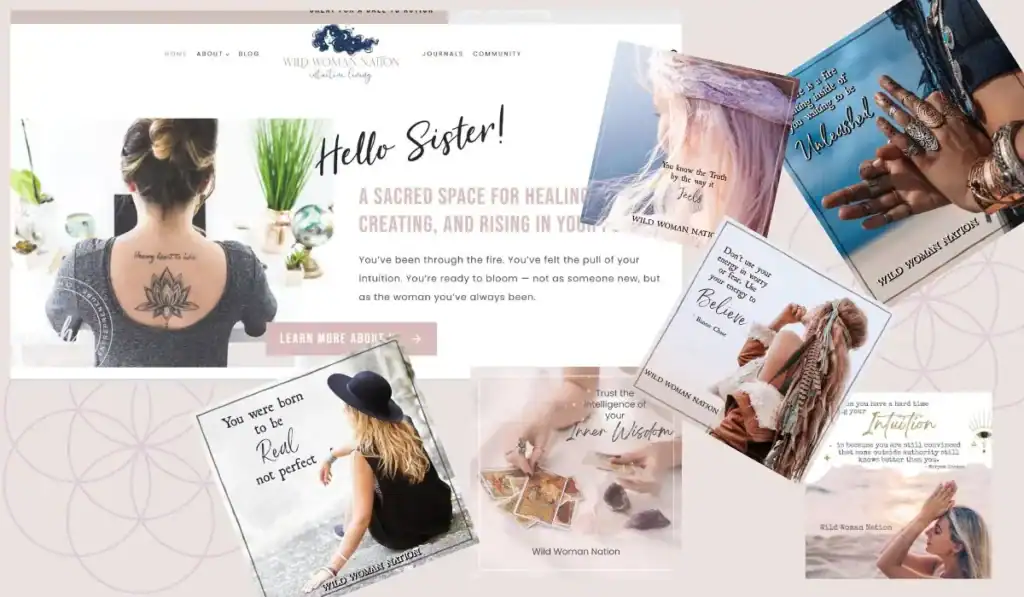
In the BOHO branded images above, there are similar colors and images throughout the brand, on the social media posts and website. The messages are similar. Notice the feeling you get from the overall brand. What feelings do you get when you look at this?
When your designs look consistent, your community recognizes your work right away. You want your brand to convey an emotion or feeling when someone looks at it.
Here’s how you can use Canva’s tools and strategies to keep your visuals on-brand, inviting, and easy to create, without spending all day on graphics.
This article explains more about using PLR products in your business.
Using Canva Templates for Consistency and Ease
Canva templates are a gift for holistic entrepreneurs who need professional results but don’t want to sacrifice hours.
Start by browsing templates with keywords that match your vibe, like “wellness,” “mindful,” “nature,” or “spiritual.”
Look for layouts that already reflect the calm, organic feel you want your brand to share.
I set up several Canva templates to keep the vibe similar across all my social platforms. This makes it easy for me to create new posts. I just switch out the message and the image, then BOOM! I’m done.
It can be that easy for you too.
Once you find a few that fit:
- Customize colors and fonts to match your holistic brand palette (pulled from your mood board or color guide).
- Swap images and icons for ones that tell your story, like peaceful landscapes, crystals, or gentle line art.
- Clone your favorite template for posts, reels, pins, and stories—then tweak each one so they feel like part of the same family, not carbon copies.
Templates help you save time, but more importantly, they build visual consistency. Your Instagram grid starts to look unified, your Pinterest pins align, and your stories feel like chapters in the same book.
Make a folder in Canva for your go-to templates. The next time you need a quick graphic, you won’t be starting from scratch.
Balancing Text and Visuals for Maximum Engagement
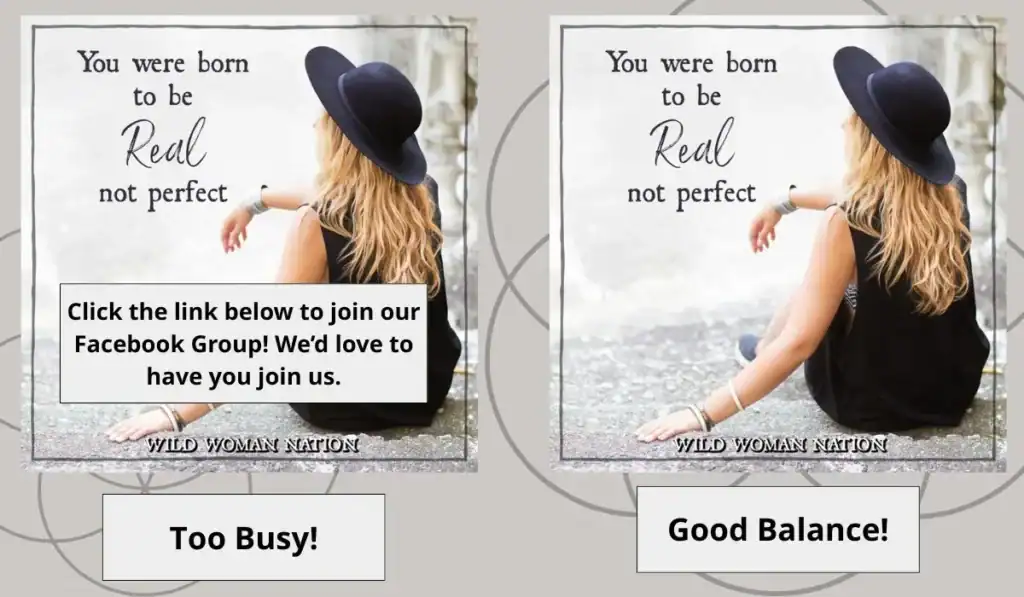
It’s tempting to share everything at once—quotes, details, calls to action—but too much text overwhelms your graphic.
If I saw the image above, I would scroll past because all the words are too overwhelming. I would stop to look at the one with better balance.
The key is balance. Arrange your design so the eye lands where you want it, then rests in open space. One simple message per post.
Keep these steps in mind:
- Establish hierarchy: Use larger or bolder text for main points, and smaller font for supporting info. For example, make affirmations standout, and list your website or handle in smaller lettering at the bottom.
- Leave white space: Don’t fill every corner. Open areas around your text and images guide the eye and create a sense of calm.
- Choose strong visuals: A serene photo or soft, organic icon speaks louder than a cluttered collage. Let beautiful images be the hero, using text as gentle support.
You’ll find that simple layouts hold attention longer. This approach works for Instagram posts, reels covers, pins, and stories for consistent, clean, and easy-to-read at a glance.
Your message comes through clearly, inviting followers to pause and connect.
When posts or images get too busy, it overwhelms my mind and I move past it. You want to hold someone’s attention and evoke a feeling.
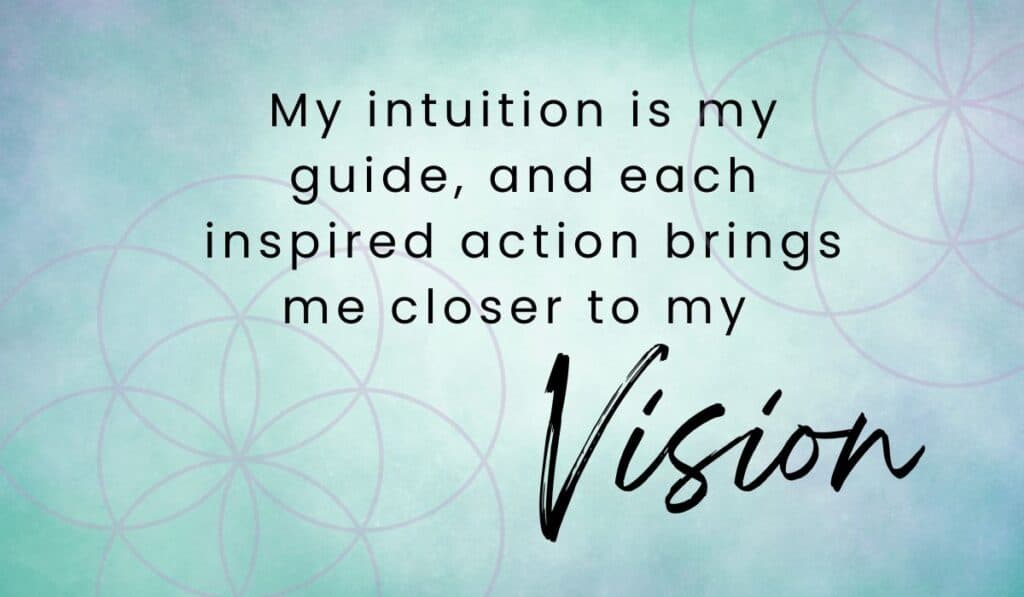
Incorporating Mindful Messaging
Holistic brands aren’t just about pretty visuals, they carry a message.
When you overlay affirmations, tips, or encouragements in your Canva designs, you invite your community to pause and reflect.
For your words to shine, they need thoughtful placement. I also like to use a script font to highlight the theme word in the message. It helps your message to “Pop.”
Here’s how you can infuse meaning without clutter:
- Pick a single, inspiring affirmation or call-to-action per graphic. Short, heartfelt messages land best.
- Use gentle, on-brand fonts so your words match your style—avoid harsh or crowded typefaces.
- Add transparency boxes or overlays behind text if the background image is busy. This small step boosts readability and keeps your aesthetic intact. If an image is too bright for your brand, use a transparent overly on top.
- Align your content: Place text where it feels balanced—top, center, or bottom—while staying mindful of the image itself.
Always check your graphic on your phone before posting. Make sure words are easy to read, and the message feels honest and true to your work.
With mindful messaging, every design is another chance to uplift and educate, building real trust with your audience.
By using these Canva design tips for holistic entrepreneurs, you’ll make graphics that are as soulful as your mission and easy to share across every channel. Your audience won’t just see your content; they’ll feel it.
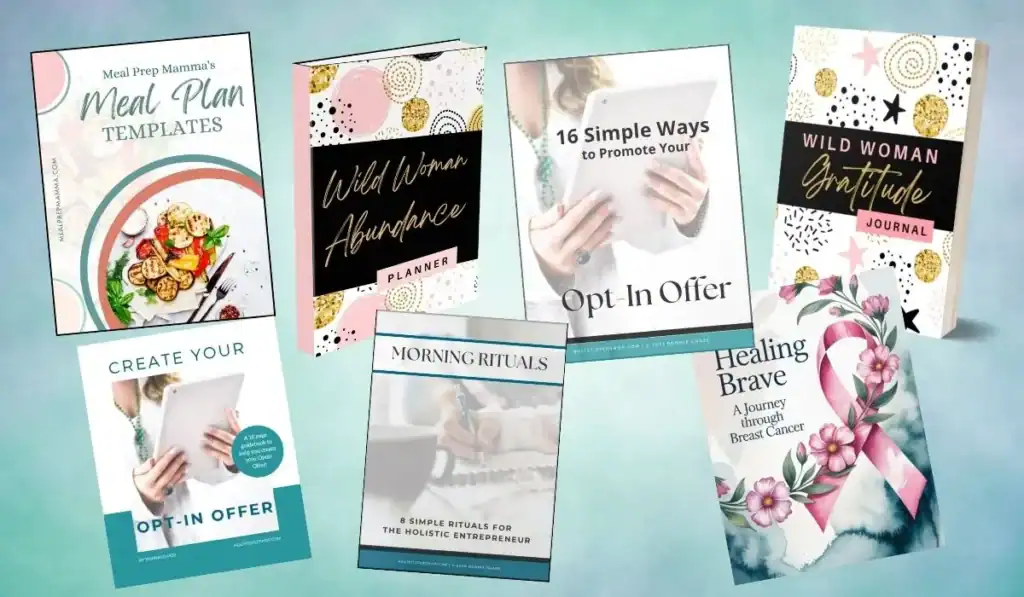
Designing Lead Magnets and Workbooks in Canva
Beautiful, valuable PDFs like lead magnets, workbooks, and journals can attract the right people to your business and give them a taste of how you can help.
I talk more about branded products and assets you can create in Canva in this blog post about Holistic Digital Products.
Canva makes it simple to design these resources even if you’ve never made a guide or a workbook before.
With a mix of intentional content structure and creative Canva features, you can create downloads that feel polished, helpful, and true to your brand.
Let’s talk about how to organize and style your holistic guides for maximum transformation and engagement.
Structuring Content for Transformation and Flow
The best workbooks and lead magnets do more than collect emails. They guide someone through a meaningful change.
You want your PDF to feel like a gentle journey, not a worksheet you rush through. Structure matters.
Use these steps to shape your content for clarity and impact:
- Open with intention. Start with a warm welcome or a short introduction. Remind your reader why they downloaded this guide and how it can support their growth.
- Break lessons into bite-sized sections. Big chunks of information overwhelm people. Use headers, short paragraphs, and clear step-by-step directions. If you’re teaching a holistic practice or daily habit, map out simple steps.
- Create reflection moments. After sharing key ideas, add prompts for journaling or quick questions to spark self-inquiry. Leave open space for answers—this invites your reader to slow down and think.
- End with a recap or next steps. Summarize what your reader just learned, and give a gentle nudge for what they can do next (like booking a session or joining your list).
You can use Canva’s pre-set page layouts for repeat sections. Save a page as a template for each new section: welcome, tip, worksheet, reflection, and conclusion.
This keeps flow consistent and makes large PDFs easy to update.
Using Canva Elements to Foster Engagement
A workbook or journal should feel inviting to use, not just pretty to look at.
Canva’s elements, like shapes, lines, and illustrations, help you create interactive, engaging pages that encourage your audience to participate and reflect.
Here are creative ways to use Canva’s tools in your holistic resources:
- Shapes as fillable fields. Add rectangles, lines, or dotted boxes where people can write answers digitally or by hand. For trackers, use circles or checkboxes to mark progress.
- Lines and dividers. Space out questions and sections with subtle lines or dividers. This keeps the page from looking crowded and guides the reader’s eye.
- Icons for quick cues. Use leaf, moon, heart, or chakra icons next to journaling prompts, tips, or affirmations. Visual cues help the brain process new ideas and add a touch of soul to your guide.
- Progress trackers. Create habit trackers with grids, rows of circles, or calendar icons. Label each with simple instructions like “Mark each day you meditate this week.”
- Inspiration boards or visioning pages. Use image frames or collage layouts for vision boards. Suggest your clients cut, paste, or digitally fill in photos of their goals.
Mix in Canva’s illustration library for background touches or borders, try soft watercolor washes or botanical line art for a peaceful vibe.
Use your brand colors so each PDF feels like an extension of your other design work.
I like to add in color splashes, sparkles, stars, textured backgrounds and faded icons to create a more creative feel. Your designs will look more professional too.
By using Canva in thoughtful ways, you turn every lead magnet or workbook into an experience that matches your brand energy.
Your guides will not only attract the right audience, they’ll help people move forward, reflect, and return for more.

Building Brand Recognition with Canva Brand Kits
Keeping your brand instantly recognizable, no matter where people find you, is key for holistic healers. Canva’s Brand Kit tools let you lock in your look and save hours.
Instead of second-guessing colors or hunting for the right logo, you can confidently create and focus on your real purpose, serving your clients.
These Canva design tips for holistic entrepreneurs will show you how to set up and use a Brand Kit so every graphic, guide, or post feels like it’s truly yours.
Uploading and Organizing Brand Assets
A well-organized Brand Kit in Canva is like a digital altar for your business. You put your most important symbols and colors in one place, ready to infuse every design with the energy of your brand.
Start by gathering the assets that make your brand unique:
- Logo: Upload every version you use—main, icon, and watermark.
- Fonts: If you have custom fonts, you can upload them (on Canva Pro), or stick with Canva’s font library and pick two or three that match your vibe.
- Color palette: Add your core brand colors. You can pull shades from your logo, favorite mood board, or a photo that inspires your practice.
- Other graphics: Sometimes you have special illustrations, background textures, or patterns that set your brand apart.
To upload:
- Click on “Brand” or “Brand Kit” in Canva’s sidebar.
- Tap the upload button for each asset (logos, fonts, palette).
- Label everything clearly. Name color swatches like “jade green” or “herbal beige,” and organize logos by use (main logo, social, favicon).
You’ll find your assets always at your fingertips. No more digging through old folders or scrolling your desktop.
Quick tips for organizing your Brand Kit:
- Keep the number of core colors limited (3-5) for a true, unified look.
- Save alternate versions of logos (white, black, color) for different backgrounds.
- Keep reference images for brand inspiration in a Canva folder.
By setting this up once, you make every new project faster and more consistent.
It feels a bit like prepping your healing space before a session: everything you need is right there, ready to support your flow.
Applying Your Brand Kit Across Projects
With your Brand Kit ready, you can apply your unique style to every project with a few clicks.
This is the secret to that “how does she always look so pulled together?” effect that builds trust with your clients.
When you open a design:
- Colors: Your brand palette pops up at the top of every color picker. Swap in your signature hues with one click.
- Fonts: Type your message, and select your custom brand fonts from the font menu for headings, body, and accents.
- Logos: Drag your logo onto workshops, handouts, or social posts. Use the right version depending on the background and size.
Canva also lets you create branded templates. This is powerful for holistic coaches who offer a mix of content: Instagram posts, eBooks, certificates, or email headers.
Save a template with your fonts, colors, and logo, then duplicate it for each new offering. This keeps your feed, documents, and resources looking like they all belong together.
Having all my design elements located in Canva’s brand kit has saved me hours of searching for elements I’ve used in the past. It saves me so much time.
Ways to use your Brand Kit for a cohesive look:
- Design a set of social graphics to promote different services or events, all with matching brand colors and fonts.
- Build lead magnets and workbooks where every page feels part of the same healing journey.
- Make consistent covers for meditations, journal prompts, or video series.
People trust brands they recognize. When your visuals are unified, your community senses your care and commitment.
This is what makes your work feel “official,” not corporate, but solid and true to your soul.
Adopt this habit, and you’ll wonder how you ever managed without it. The right tools and these Canva design tips for holistic entrepreneurs give you more time to focus on changing lives, not wrestling with design.

Time-Saving Tips and Collaboration on Canva
Holistic entrepreneurs often wear many hats, so saving time while staying true to your brand matters.
Canva makes it easy to manage your creative workload and work with others, whether you’re batching social posts or building resources with a team.
Here’s how you can use Canva’s best features to support a soulful brand while freeing up more time for your real work.

Batch Designing and Scheduling
Batch creation keeps your creativity flowing and cuts down on daily decisions. With Canva, you can design several graphics at once, then schedule them in advance.
This approach creates more room in your week for client sessions, rest, and inspiration.
Here’s how to batch design and schedule with Canva:
- Pick a theme or project: Decide what you need ahead of time, such as all your Instagram posts for the month or graphics for an upcoming program.
- Start with templates: Use your go-to Canva templates for each type of graphic. This keeps things styled and on-brand.
- Switch up details: Swap out text, quotes, colors, or images for each post, but keep the base design. This saves brainpower and keeps your feed cohesive.
- Use folders: Organize your graphics by topic or platform in Canva folders. You’ll find what you need quickly, and stay on track.
When your designs are ready:
- Download everything at once, or
- Use Canva’s content planner (available with Canva Pro) to schedule posts directly to Instagram, Facebook, Pinterest, or LinkedIn.
Batch designing with Canva gives you back hours every month. You spend less time toggling between ideas and more time serving clients or caring for yourself.
Bonus tip: Schedule a weekly or monthly design day. Put on your favorite playlist, brew some herbal tea, and let Canva do the heavy lifting. You’ll end each session with dozens of ready-to-post graphics.
Collaborating Securely with Others
Running a holistic business doesn’t mean doing everything alone. You might work with a virtual assistant, a co-facilitator, or even clients who need input on designs.
Canva’s collaboration tools help you share your creative projects without losing control of your brand’s energy.
For soulful, secure collaboration in Canva:
- Share projects with specific permissions: Invite someone by email and choose their access level. Select “can edit” if you want them to update graphics, or “can view” to keep your original designs safe.
- Use team folders: Canva Pro users can create shared folders for projects. Only approved team members can access these, making it easy to separate client files from admin tasks.
- Comments and feedback: Team members can leave notes directly inside the design, helping you review changes without messy email threads.
- Version history: Canva keeps a record of edits, so you can always return to a previous version if needed.
To maintain brand harmony:
- Set up your Brand Kit: This keeps your brand colors, logos, and fonts locked in, so every collaborator works within your sacred style.
- Create “master” templates: If you outsource design tasks, give your VA or assistant branded templates as a starting point. This keeps all finished graphics looking like you, no matter who hits the final “download.”
- Limit sharing links: Send invites only to people you trust, and avoid posting sensitive links publicly.
With these canva design tips for holistic entrepreneurs, you can invite help without worry.
You keep your message clear, your vibe aligned, and your energy focused where it belongs.
Collaboration should feel supportive, never chaotic—and Canva makes that possible.
Next Steps
You’re now ready to apply these Canva design tips for holistic entrepreneurs and shape every touchpoint into an authentic experience. Use your core brand words and palette as your guide.
Trust that simple, soulful designs create the strongest connections. Let visuals and mindful messaging support your mission—not distract from it.
The best brands grow from consistency and heart. When you build mood boards, use Brand Kits, and choose calming images, your business stands out in a gentle and memorable way.
Save time by batching designs and setting up templates, so you can focus on serving your community and growing your impact.
Start today: try one tip from this guide in your next graphic, or explore my collection of ready-to-use Canva templates made for holistic businesses like yours.
Your feedback and your creative spirit are always welcome here. How will you use your new design skills to support your unique path?
If this post helped you in any way, please pin one of these images below!